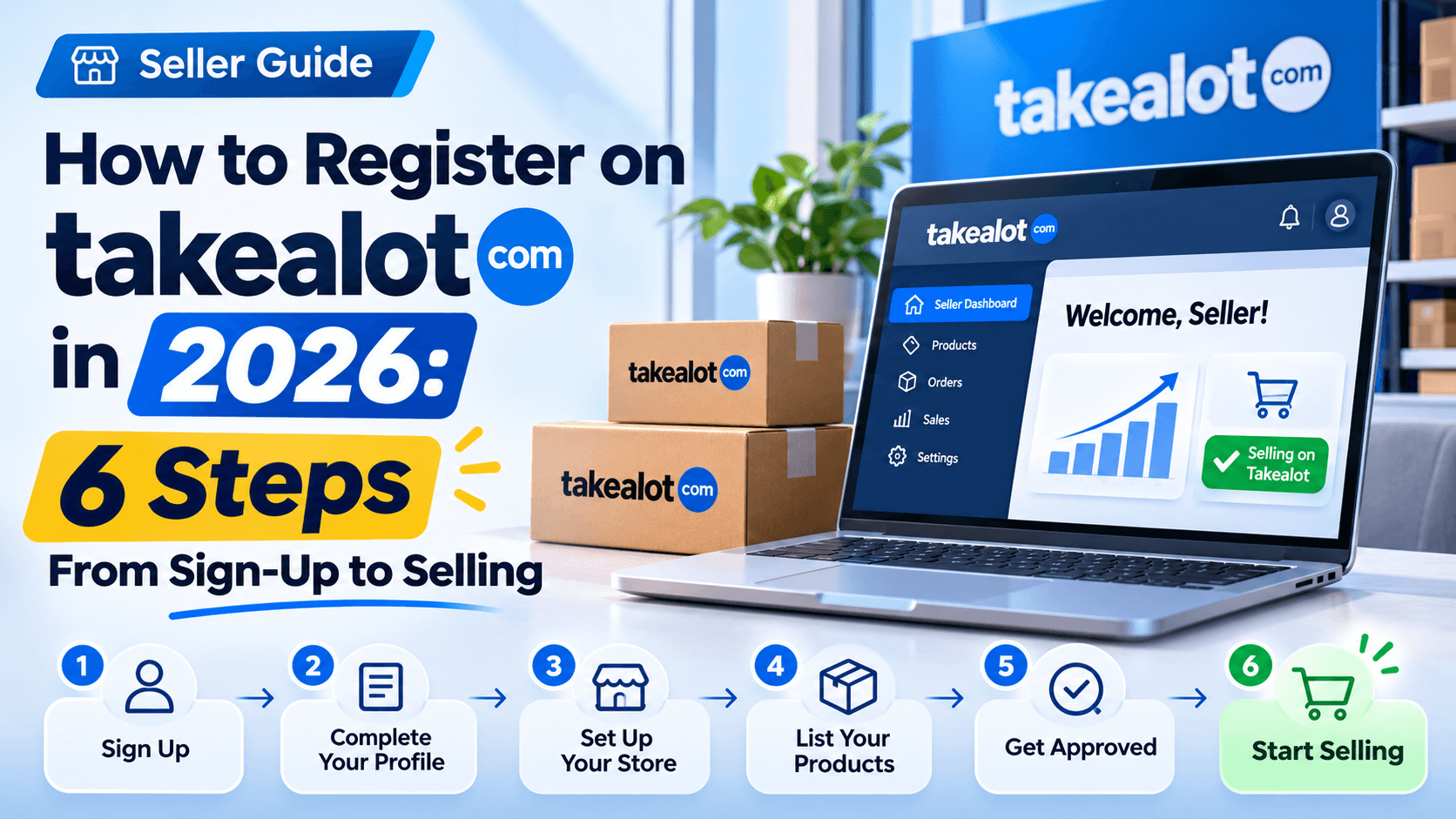
How to Register on Takealot in 2026: 6 Steps From Sign-Up to Selling
For South African entrepreneurs, Takealot offers an opportunity to sell products online without building an independent e-commerce website or managing every part of the delivery process.
However, knowing how to register on Takealot involves more than creating an account. If you want to sell products, you must complete a separate seller application, provide the required documents, and prepare your products for listing.
This guide covers the registration process, from selecting the correct account to submitting your application and getting your first products live. You'll also learn how Takealot's fees, fulfilment options, and pricing decisions affect your business after approval.
1. Takealot Account Types and Seller Registration Requirements
Takealot Customer Account vs. Seller Account: What's the Difference?
Takealot offers different account types depending on whether you want to buy or sell products.
A customer account allows you to place orders, track deliveries, and manage returns. A seller account gives approved merchants access to the Takealot Seller Portal, where they can manage product listings, prices, stock, and sales.
Creating a regular shopping account does not automatically make you a Takealot seller. You must submit a separate seller application through the official Takealot website.
How to Create a Takealot Customer Account
If you only want to shop on Takealot, registration is straightforward.
- Visit Takealot.com.
- Select the registration or sign-up option.
- Enter the personal details requested and create your login credentials.
- Complete any required email or mobile verification.
- Sign in and add your delivery address when you're ready to order.
Takealot requires individual shopping-account holders to be at least 18 years old and legally able to enter contracts in South Africa.
Takealot Seller Registration Requirements in South Africa
South African individuals and registered businesses may apply to sell on Takealot. A registered company is not necessarily required for an individual seller, although applicants must still pass Takealot's verification process.
Before applying, ensure you have accurate contact information, a reliable stock source, and a workable plan for delivering products.
International applicants should confirm their eligibility and any local banking, tax, and fulfilment requirements directly with Takealot before committing to inventory.
Documents and Banking Details Needed for a Takealot Seller Account
Prepare the following information before starting your seller application:
- South African ID or applicable identity documents.
- Company registration details, if applying through a business.
- Bank account information, including account holder name and branch code.
- VAT registration information, if applicable.
- Business and warehouse addresses, plus details of the products you intend to sell.
Depending on your business type, Takealot may request additional verification or supporting documents.
Practical tip: Ensure the legal name used in your application matches the relevant identity, business, and banking records. Resolve inconsistencies before submitting your documents to reduce avoidable verification delays.
2. Step-by-Step Guide to Takealot Seller Registration
Step 1 — Visit the Official Takealot Seller Registration Page
Go to the Takealot Seller Solution page and select Apply to Sell.
This is the official starting point for seller applications. You do not need to purchase a product or create a shopping account first.
Takealot separates its onboarding process into application, approval, registration, and onboarding stages before sellers can begin selling.
Step 2 — Complete the Takealot Seller Application Form
Fill in the requested information about yourself, your business, and the products you intend to sell.
Be prepared to provide your contact information, business location, product categories, and details of your existing operations.
Describe your products specifically. For example, writing "stainless-steel water bottles and accessories" is more informative than simply entering "general merchandise".
Review your email address, mobile number, and business information before submitting the application. The exact fields may change, so follow the instructions displayed on the current form.
Step 3 — Wait for Takealot Seller Account Approval
Takealot states that its team will review your application and contact you within 10 business days. This is an expected response timeframe, not a guarantee of approval or a fully operational store.
While waiting, prepare your product photographs, barcode information, supplier invoices, and cost calculations.
Monitor your registered email inbox, including spam folders. If additional information is requested, provide the correct documents through the official application channel.
Step 4 — Set Up Your Takealot Seller Portal Account
After approval, follow Takealot's onboarding instructions to complete your seller account.
This typically involves verifying your identity or business, providing banking and tax information where applicable, and confirming your operating addresses.
You'll also need to understand Takealot's stock models and complete the required onboarding activities.
The Takealot Seller Portal becomes your main workspace for managing listings, inventory, pricing, and performance.
Important: Application approval, seller account activation, and product listing approval are separate milestones. Your products are not automatically available for purchase when your seller application is accepted.
Takealot seller registration workflow: six steps from application to first saleFigure: The six stages of preparing and launching a Takealot seller account. Illustration by Revenuealot.
3. How to Start Selling and Growing Your Takealot Business
Step 5 — Create and Optimize Your First Takealot Product Listing
Once your seller account is activated, you can begin adding products.
First, search the Takealot catalogue using your product's barcode or name. If the product already exists, you may be able to add your own offer instead of creating a duplicate listing.
For new products, prepare accurate listing information, including:
- A descriptive product title with brand and model details.
- Clear product photographs, preferably against a white background.
- Specifications such as size, colour, materials, and dimensions.
- Correct barcode information and product category.
Follow the applicable category and image requirements in the Seller Portal. New catalogue submissions may require review before they become available to customers.
Step 6 — Set Up Inventory, Fulfillment, and Product Pricing
Takealot sellers generally work with two stock models.
Stock model | How it works | Practical consideration |
|---|---|---|
In-Stock | Inventory is stored at Takealot distribution centres. | Useful for products with established demand, but monitor stock levels and storage costs. |
Lead Time | Sellers retain inventory until an order is received, then follow Takealot's fulfilment instructions. | Useful for testing products without sending large quantities to distribution centres. |
For a new store, consider testing a small selection of products before committing to larger quantities.
Set your selling price only after calculating product costs, marketplace fees, fulfilment charges, and an allowance for returns.
Understand Takealot Seller Fees and Commission Structures
Takealot's official seller page lists a monthly subscription fee of R400 excluding VAT, plus additional fees associated with selling and fulfilment.
Fee type | What sellers should know |
|---|---|
Monthly subscription | R400 per seller account per month, excluding VAT |
Success fees | Vary according to product category |
Fulfilment fees | Depend on applicable product and fulfilment characteristics |
Storage fees | May apply to eligible overstocked inventory at distribution centres |
For example, suppose you sell a product for R500, with R220 in product costs, R60 in assumed success fees, R45 in fulfilment charges, and R15 allocated to other variable costs.
Your estimated contribution is:
R500 − R220 − R60 − R45 − R15 = R160
This is an illustrative calculation, not an official Takealot fee quote. It excludes allocated monthly overhead and must be adjusted for your actual VAT treatment and tax obligations.
Use the Takealot Fees Calculator and current Seller Portal fee schedules before finalising your prices. Fee structures can change.
Monitor Sales Performance and Competitor Pricing with Revenuealot
After your first listings go live, monitor sales, returns, stock availability, and pricing regularly.
The Takealot Seller Portal provides essential operational information. For deeper marketplace analysis, Revenuealot offers additional tools for Takealot sellers.
For example, sellers can use Revenuealot to compare product performance, research competing offers, and monitor pricing changes. Its Auto Pricing feature also supports configurable minimum and maximum price boundaries.
Start by monitoring your highest-selling products and checking whether competitor price changes are affecting your sales. Before enabling automatic pricing, calculate a minimum price that protects your required margin.
The objective is not simply to offer the lowest price, but to maintain competitive listings while keeping each sale commercially worthwhile.
FAQ: Frequently Asked Questions About Takealot Registration
1. Is It Free to Register on Takealot?
Creating a customer shopping account is free. Selling through a Takealot seller account involves a monthly subscription fee of R400 excluding VAT, alongside applicable success, fulfilment, and storage fees. Check the current fee schedule before applying.
2. Can I Sell on Takealot Without a Registered Company?
South African individuals may apply to sell without necessarily having a registered company. However, you still need to meet Takealot's current application, identity verification, banking, and other eligibility requirements. Approval is not automatic.
3. Can International Sellers Register on Takealot?
Takealot has onboarded international sellers, but eligibility and operating requirements can differ from those for South African applicants. Foreign sellers should confirm the applicable business registration, banking, tax, import compliance, and fulfilment requirements directly with Takealot before applying.
4. How Long Does Takealot Seller Approval Take?
Takealot states that applicants should receive a response within 10 business days. This does not necessarily mean your seller account will be fully operational within that period. Document verification, onboarding, and product listing approval can require additional time.
5. What Should I Do If My Takealot Seller Application Is Rejected?
Start by reviewing the rejection notice and identifying any missing documents, incorrect business information, or eligibility concerns.
Correct the relevant issues and contact Takealot through its official seller application channel to clarify whether you can update or resubmit your application.
Avoid submitting duplicate applications before understanding why the original application was unsuccessful.
Conclusion
Registering on Takealot is the first step towards building an online retail business in South Africa. Prepare accurate documents, follow the official application process, and understand your fees before listing products.
Once your store is live, focus on keeping inventory accurate, monitoring sales, and maintaining profitable prices.
With tools such as Revenuealot, you can make more informed decisions about product performance and competition as your Takealot business grows.