How to Register Shopify in South Africa and Get Paid in 2026
Shopify is a realistic option for South African ecommerce sellers in 2026, but it is not a plug-and-play payments setup in the same way it is in Shopify Payments countries.
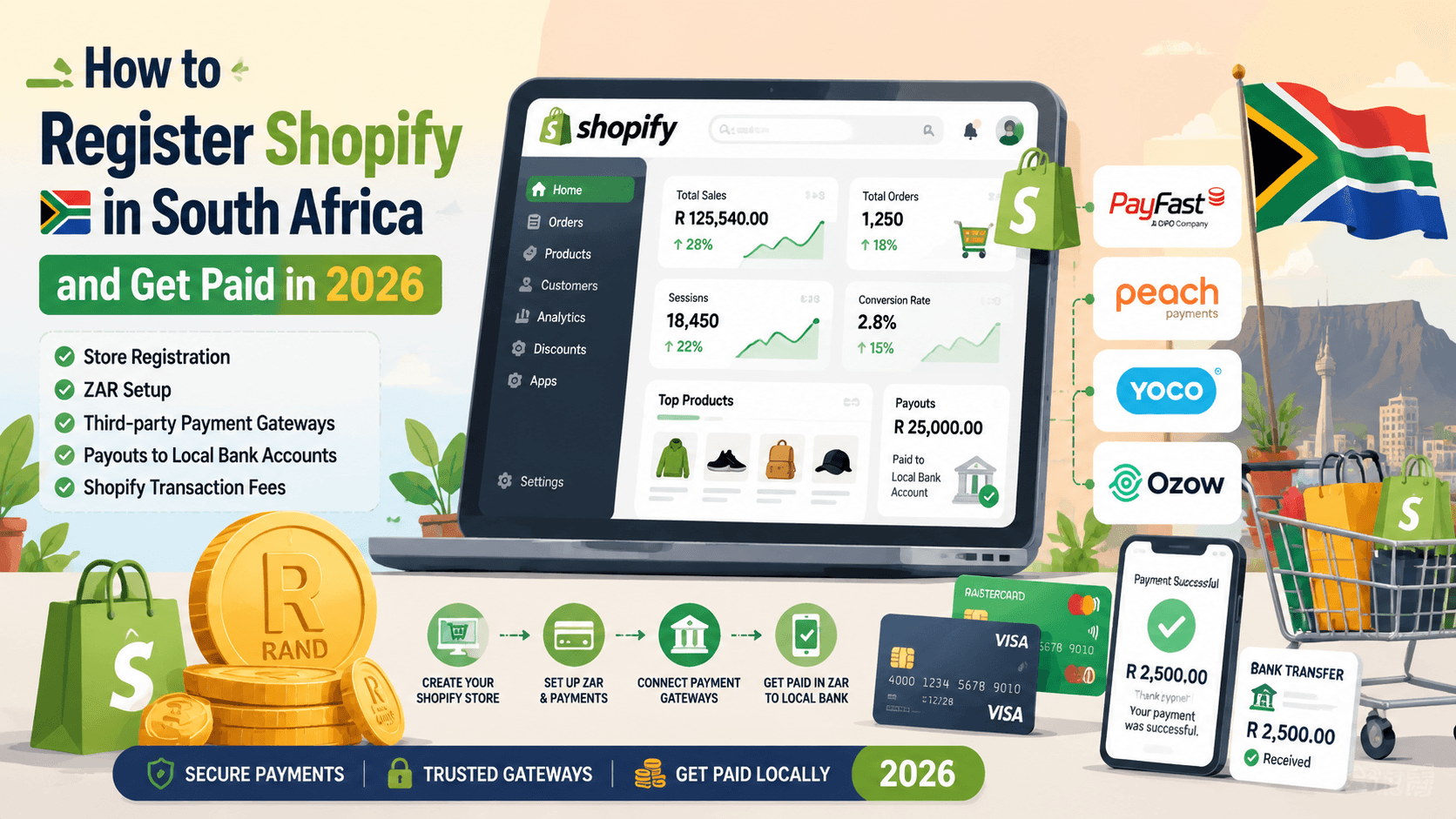
The practical reality is simple: a South African merchant can register a Shopify store, sell in ZAR, connect a custom domain, and receive online payments. But because South Africa is not listed on Shopify's Shopify Payments supported countries page, most local sellers need a third-party gateway such as PayFast, Peach Payments, Yoco, or Ozow.
That one detail changes the whole operating model. You are not only choosing a website platform. You are choosing how card payments, EFT, wallets, refunds, fraud checks, and bank settlement will work.
2026 note: Payment rules, gateway fees, payout timing, and wallet availability can change. Treat the gateway notes below as a practical setup framework, then confirm the latest commercial terms with Shopify and your payment provider before launching.
Why Shopify Is Growing in South Africa
South African sellers are using Shopify for a different reason than marketplace sellers use Takealot, Amazon, Makro, or Bob Shop.
Marketplaces give you buyer traffic, but they also control the customer experience, ranking system, commission model, fulfilment rules, and pricing pressure. Shopify gives you more control over the brand, customer data, landing pages, email capture, bundles, subscription offers, wholesale pages, and international storefront experiments.
For a local brand, Shopify becomes useful when:
- you want your own domain instead of only a marketplace listing
- you need full control over product pages and checkout messaging
- you want to run paid traffic from Meta, Google, TikTok, email, or influencers
- you sell products that need education before conversion
- you want repeat customers instead of one-off marketplace transactions
- you plan to use marketplaces as extra channels rather than your only channel
That is also why Shopify and South African marketplaces are not mutually exclusive. A seller can use Takealot or Amazon for marketplace demand while using Shopify as the brand-owned storefront. If you are comparing marketplace options, read our guide to Amazon South Africa in 2026 and the Amazon vs. Takealot comparison.
Can South Africans Use Shopify in 2026?
Yes. South African sellers can create and operate a Shopify store in 2026.
What they cannot assume is direct access to Shopify Payments. Shopify's South Africa payment-gateway directory is the better starting point because it points merchants toward third-party payment providers available for South Africa.
In practical terms, that means your Shopify setup has three layers:
Layer | What you configure | Why it matters |
|---|---|---|
Store layer | Store name, products, theme, shipping, taxes, policies | This is the Shopify storefront customers see |
Currency layer | Usually ZAR for South African buyers | This affects pricing, reporting, buyer trust, and gateway compatibility |
Payment layer | PayFast, Peach Payments, Yoco, Ozow, or another provider | This controls authorisation, refunds, settlement, and bank payout |
The most common mistake is treating those layers as one setting. They are connected, but they are not the same.
How to Register a Shopify Store in South Africa
The store-registration flow itself is straightforward. The payment setup is where most sellers need to slow down.
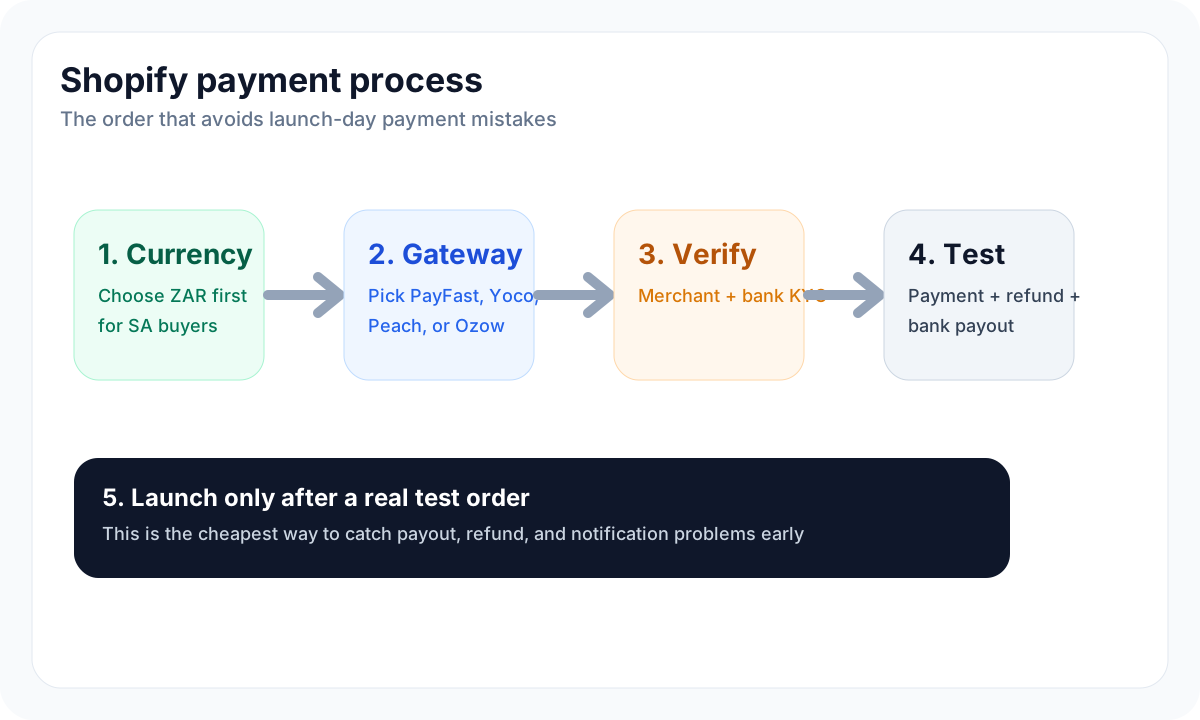
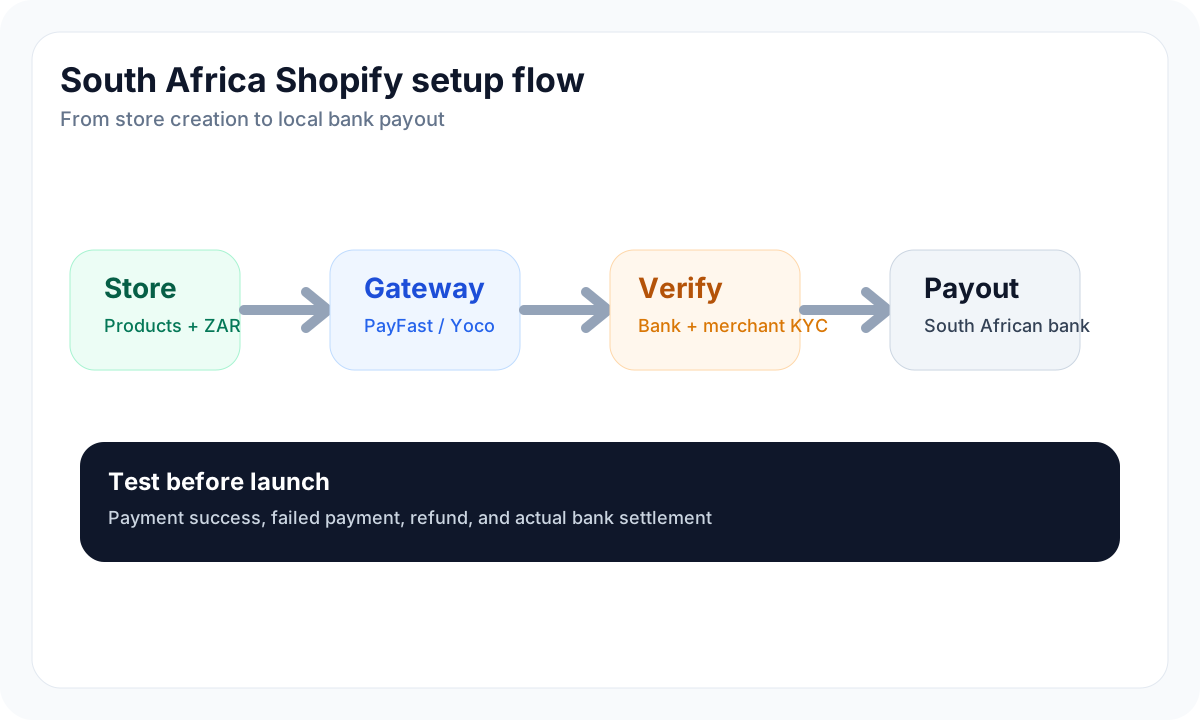
Start with this order:
- Create the Shopify account and choose your store name.
- Set the store address and business contact details accurately.
- Decide whether your customer-facing currency should be ZAR.
- Add products, shipping zones, refund policy, privacy policy, and terms.
- Connect your domain.
- Choose the payment gateway that matches your business model.
- Complete gateway verification before you send paid traffic.
- Test a small real transaction, refund, and payout before launch.
Required documents
Shopify does not usually ask every new merchant for the same documents on day one, but your payment gateway will almost certainly require verification before payouts are fully enabled.
Prepare these before you start:
- South African business name and trading name
- CIPC registration document if you operate through a company
- director or owner ID document
- proof of address if requested
- SARS VAT number if you are VAT registered
- South African bank account confirmation
- clear refund, shipping, and privacy policies
- product category information, especially for regulated or high-risk products
PayFast, Yoco, Peach Payments, and Ozow all need to understand who is receiving money. This is not just paperwork. If your Shopify store name, gateway merchant name, bank account name, and policy pages do not match, verification and payouts can be delayed.
Choosing store currency
For most South African sellers, ZAR is the clean default.
Use ZAR if:
- your customers are mainly in South Africa
- your products are priced against local competitors
- you want checkout totals to feel familiar
- your gateway and bank settlement are in rand
- your accounting is managed locally
Use USD, EUR, or GBP only if you have a clear cross-border reason. Otherwise you can create currency confusion, international card-decline risk, refund friction, and accounting noise.
This is especially important with PayFast because PayFast's own support material says it processes in ZAR. With any gateway, confirm supported currencies before changing the Shopify store currency.
Domain setup
Do not launch serious paid traffic on a temporary Shopify subdomain.
A South African buyer is more likely to trust a store with:
- a clear
.co.zaor brand domain - matching email sender domain
- visible contact details
- payment logos that match the checkout methods
- refund and delivery policies written for South Africa
If you already sell on Makro, Amazon, or Takealot, your Shopify domain should not feel like a random side page. It should look like the brand's owned channel.
Why Shopify Payments Is NOT Available in South Africa
Shopify Payments is Shopify's native payment processor. In supported countries, it simplifies card acceptance, payouts, and some fee handling inside Shopify.
South Africa is different. As of 2026, South Africa is not on Shopify's supported-country list for Shopify Payments. That means a South African merchant normally uses a third-party payment provider instead of Shopify Payments.
This affects four things:
- Gateway choice: you must select and activate a South African-compatible provider.
- Verification: the gateway, not only Shopify, decides what merchant documents it needs.
- Settlement: funds are paid out by the gateway or payment provider to your bank account.
- Fees: Shopify can charge an additional third-party transaction fee on top of gateway fees.
This is why the payment decision should be made before you finish the store design. Checkout method, payout timing, and fee stack can change your margins.
Best Shopify Payment Gateways for South Africa
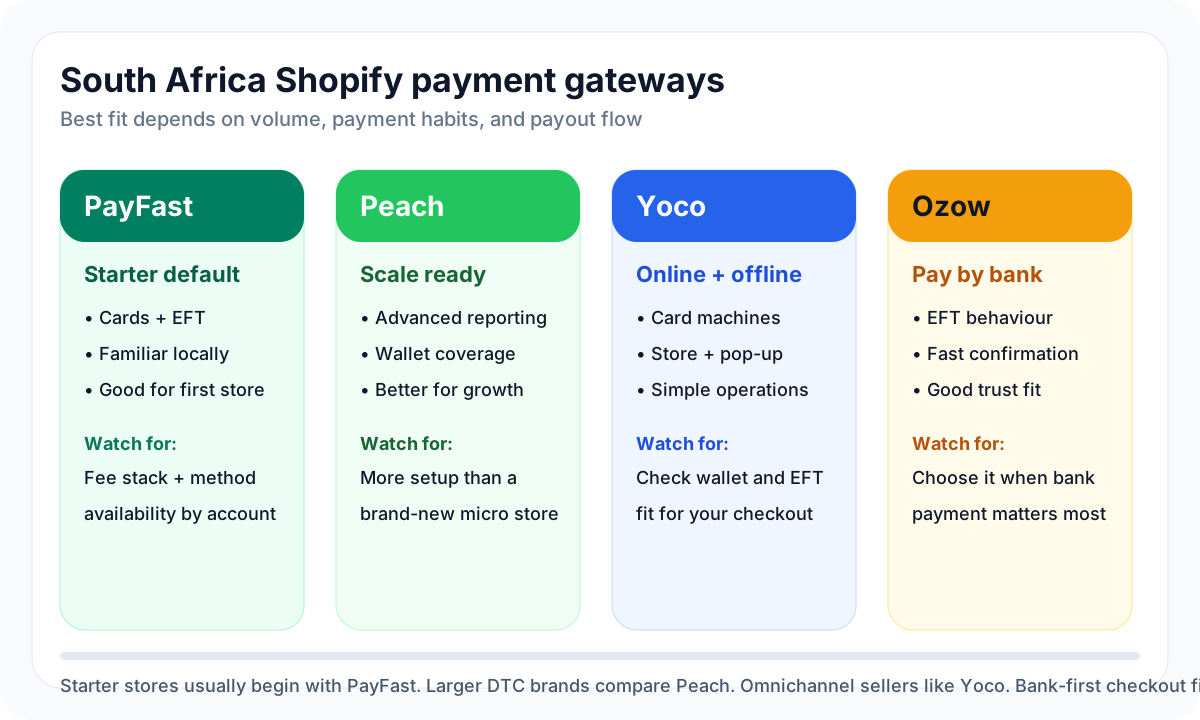
There is no single best gateway for every store. The right choice depends on order volume, customer payment habits, offline needs, refund workflow, and how much payment-method coverage you need from day one.
PayFast
PayFast is usually the default starting point for small and mid-sized South African Shopify sellers.
It is popular because local customers recognise it, setup is familiar, and it covers the payment methods most new stores need. PayFast has Shopify integration material and product pages for methods such as cards, Instant EFT, Apple Pay, and Google Pay. Its Google Pay announcement in 2026 is especially relevant for mobile checkout, because a large share of South African ecommerce traffic is mobile-first.
Choose PayFast if:
- you want the most familiar starter gateway
- you mainly sell to South African customers
- you need cards plus local EFT-style options
- you want a setup that many local Shopify agencies already understand
The tradeoff is that you still need to check method availability, gateway fees, payout timing, and PayFast account verification before launch.
Peach Payments
Peach Payments is often a better fit once a store has meaningful volume, more complex payment requirements, or a team that wants a more enterprise-style payment stack.
Peach positions itself around online payments, multiple payment methods, card processing, subscriptions, fraud tools, and larger merchant needs. It also lists Apple Pay and Google Pay in its payment-method coverage, which matters for stores that want wallet checkout without relying only on card entry.
Choose Peach Payments if:
- your monthly card volume is already meaningful
- you need stronger payment operations and reporting
- you are negotiating rates rather than accepting starter pricing
- you expect to add more complex checkout or recurring-payment flows
- you want a provider that can grow with a larger DTC brand
For a very small store, Peach may be more setup than you need. For a scaling store, it can make sense earlier than sellers expect.
Yoco
Yoco is strongest for sellers who need online and offline payments under one commercial relationship.
Its Shopify integration page focuses on accepting card payments through Shopify and says customers can pay online while payouts are made to the merchant. Yoco's wider online-payment product also promotes wallet options such as Apple Pay and Google Pay.
Choose Yoco if:
- you sell at markets, pop-ups, events, or a physical store
- you already use Yoco card machines or online payments
- you want one provider for offline and online cash flow
- you value a simple operational setup more than deep enterprise payment tooling
The main question is whether Yoco covers all the payment methods your Shopify customers expect. If you need heavy EFT behaviour, compare it carefully with PayFast or Ozow.
Ozow
Ozow is strongest when you want bank-to-bank payment behaviour: EFT, Pay By Bank, Capitec Pay-style flows, and customers who prefer not to use a card.
Ozow's current pricing page also lists card payments, Apple Pay, Google Pay, payouts, and refunds, so it is broader than a simple "EFT only" label. Still, for Shopify sellers, its strategic value is usually strongest when your customer base is comfortable paying directly from a South African bank account.
Choose Ozow if:
- your audience prefers EFT or pay-by-bank checkout
- you sell higher-ticket products where card limits can be a problem
- you want real-time confirmation instead of manual EFT proof of payment
- your margin model benefits from lower bank-transfer style costs
Ozow is not always the first gateway a beginner chooses, but it can be a strong second method beside card acceptance.
How South African Sellers Actually Get Paid
The customer does not pay Shopify directly in the way many beginners imagine.
In a third-party gateway setup, the flow normally looks like this:
- The customer adds products to cart in Shopify.
- Shopify sends the customer through the selected payment method at checkout.
- The gateway authorises the card, wallet, EFT, or pay-by-bank payment.
- Shopify receives the order status.
- The gateway records the merchant balance.
- The gateway settles funds to the seller's South African bank account according to its payout schedule.
- Refunds and chargebacks are managed through Shopify, the gateway, or both, depending on provider rules.
The important point is that payout timing is a gateway question, not only a Shopify question. Yoco, for example, advertises payouts to merchant bank accounts, while Ozow's pricing page lists next-day settlements and payout products. PayFast and Peach Payments also require merchant account verification before reliable payout operations.
Do not launch until you have tested:
- a successful card payment
- a declined card or failed payment
- an EFT or pay-by-bank payment if enabled
- a refund
- a payout to your bank account
- the email notifications customers receive
Shopify Transaction Fees Explained
South African sellers need to budget for two fee layers:
- Gateway fee: charged by PayFast, Peach Payments, Yoco, Ozow, or another provider.
- Shopify third-party transaction fee: charged by Shopify when you use an external payment provider instead of Shopify Payments.
As of 2026, Shopify's fee ladder for third-party transactions is usually discussed like this:
Shopify plan | Typical third-party transaction fee | What it means for South African sellers |
|---|---|---|
Basic | 2.0% | Painful for low-margin products, but common for new stores |
Grow | 1.0% | Better once sales are consistent |
Advanced | 0.6% | Often worth modelling when volume grows |
Plus | Lower enterprise rate | Relevant only for larger brands |
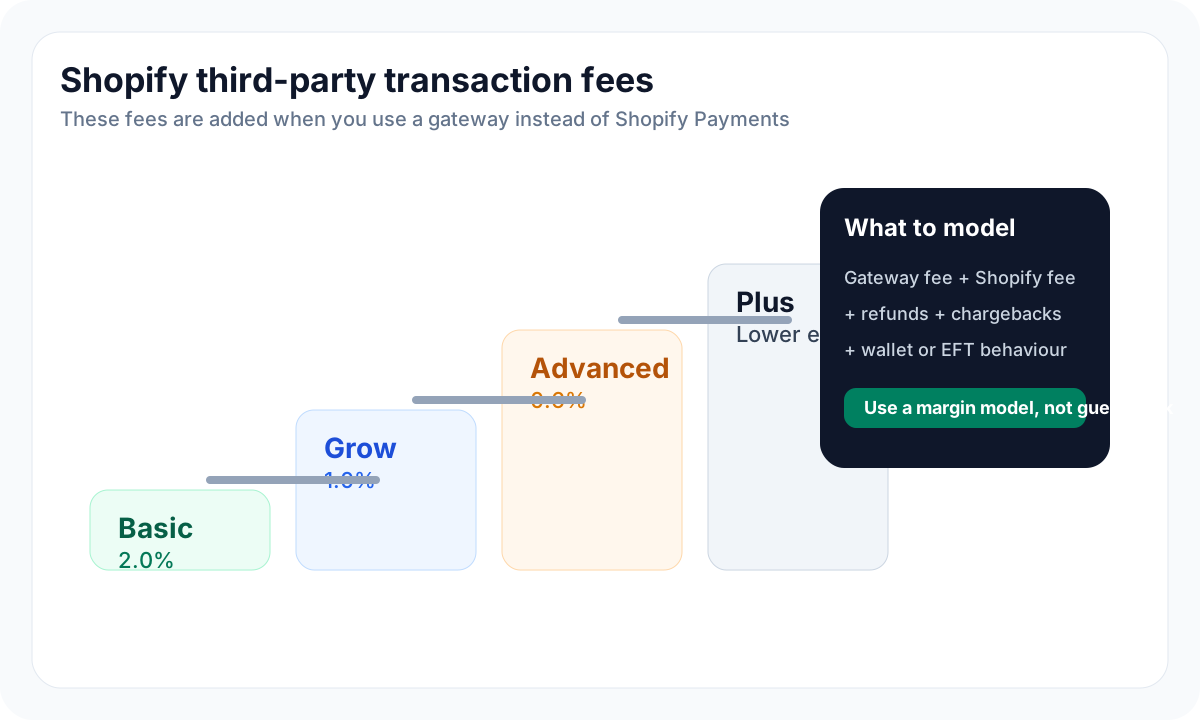
This fee is easy to underestimate. If your gateway charges a card fee and Shopify adds a third-party transaction fee, your true payment cost is the combination of both.
Example:
- product sells for R1,000
- gateway fee is charged by your provider
- Shopify third-party fee is also charged
- refund, chargeback, or wallet fees may add more operational cost
That is why payment setup belongs in your margin model, not at the end of your launch checklist.
Best Payment Gateway by Business Type
Use this as a practical starting point, not a final contract decision.
Seller type | Best starting point | Why |
|---|---|---|
First Shopify store in South Africa | PayFast | Familiar, widely used, easy to explain to customers |
Higher-volume DTC brand | Peach Payments | Better fit for scale, reporting, negotiation, and advanced methods |
Online plus offline seller | Yoco | Useful if you also sell through card machines, pop-ups, or retail |
EFT-heavy customer base | Ozow | Strong for pay-by-bank and local bank payment behaviour |
International-focused brand | Compare Peach, PayFast, and card coverage carefully | International cards, currency, fraud, and chargebacks become more important |
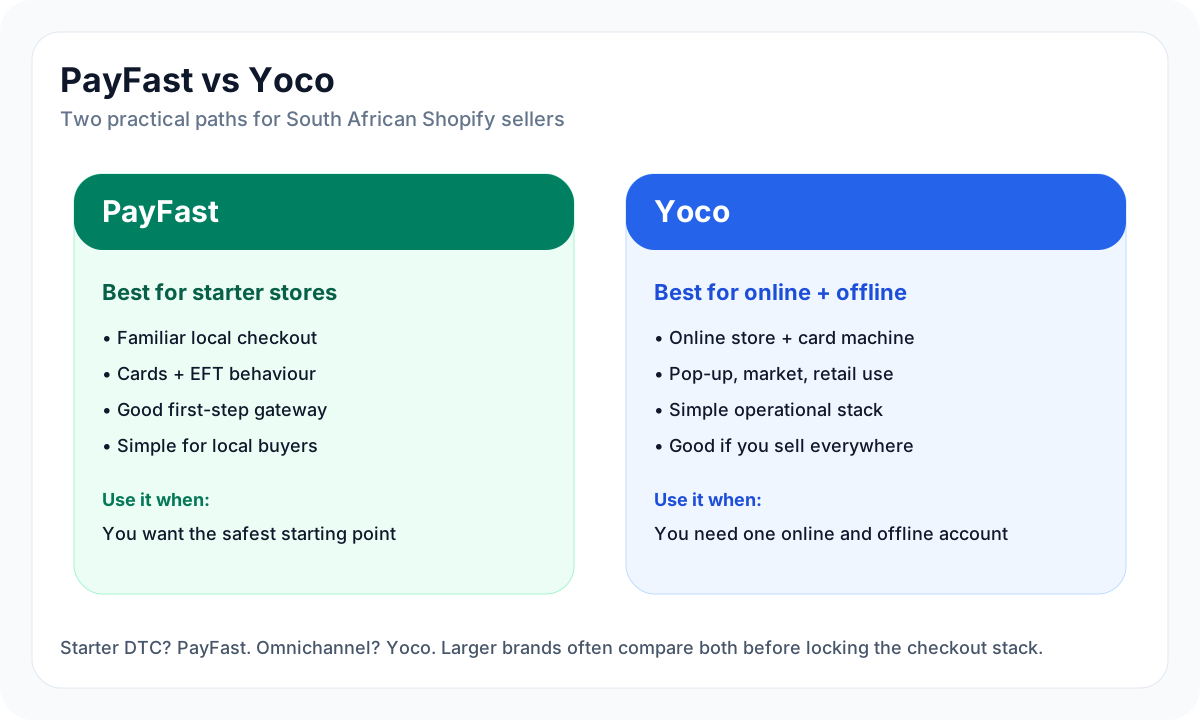
If you are starting from zero, PayFast is usually the most practical first gateway. If you already know your order volume and want to negotiate seriously, Peach Payments deserves attention. If your business has a physical sales layer, Yoco may keep your online and offline payments cleaner. If customers ask for EFT or pay-by-bank, add Ozow to the shortlist.
Common Problems South African Sellers Face
The most common problems are operational, not technical.
Currency mismatch
A store prices in USD because the owner watched an international Shopify tutorial, but the buyers are South African. Checkout feels foreign, card declines increase, and customer support gets questions about rand pricing.
For a local store, start with ZAR unless you have a clear reason not to.
Payment gateway not approved before launch
Some sellers build the entire Shopify site first, launch ads, then discover the payment provider still needs bank proof, identity checks, risk review, or additional business details.
Fix this by applying for the gateway before final launch week.
Underestimating Shopify's extra fee
South African sellers often compare gateway fees only. That is incomplete. If Shopify Payments is not available and you use a third-party provider, model Shopify's additional transaction fee too.
No refund test
Refunds are where messy setups reveal themselves. Run a small test order and refund before you have real customer pressure.
Choosing a gateway only by headline fee
The cheapest headline fee is not always the best option. Payment success rate, payout reliability, supported methods, fraud tools, customer trust, and support response time can matter more than a small fee difference.
Final Recommendation
For most South African Shopify sellers in 2026, the cleanest setup is:
- register Shopify with accurate South African business details
- set the storefront currency to ZAR
- connect a real domain before paid traffic
- start with PayFast if you need the most familiar local setup
- consider Peach Payments once volume and payment operations become serious
- use Yoco if offline and online payments need to sit together
- add Ozow if your customers prefer EFT or pay-by-bank
- model Shopify's third-party transaction fee before pricing products
Shopify can work well in South Africa, but only if you treat payments as part of the business model. The sellers who get into trouble are usually not the ones who choose the wrong theme. They are the ones who launch without understanding settlement, fees, refunds, and the extra cost of operating in a non-Shopify Payments country.