Takealot Product Research Guide: Find Low-Competition Opportunities with Revenuealot Black Box
Takealot product research gets expensive when you validate crowded niches too late.
Most sellers do not struggle to come up with product ideas. They struggle to tell the difference between a market that looks active and a market that still leaves room for another seller.
That is why Takealot product research is usually harder than simple idea generation. A category can look attractive at first glance, then turn out to be crowded, brand-heavy, price-sensitive, or protected by deep review history.
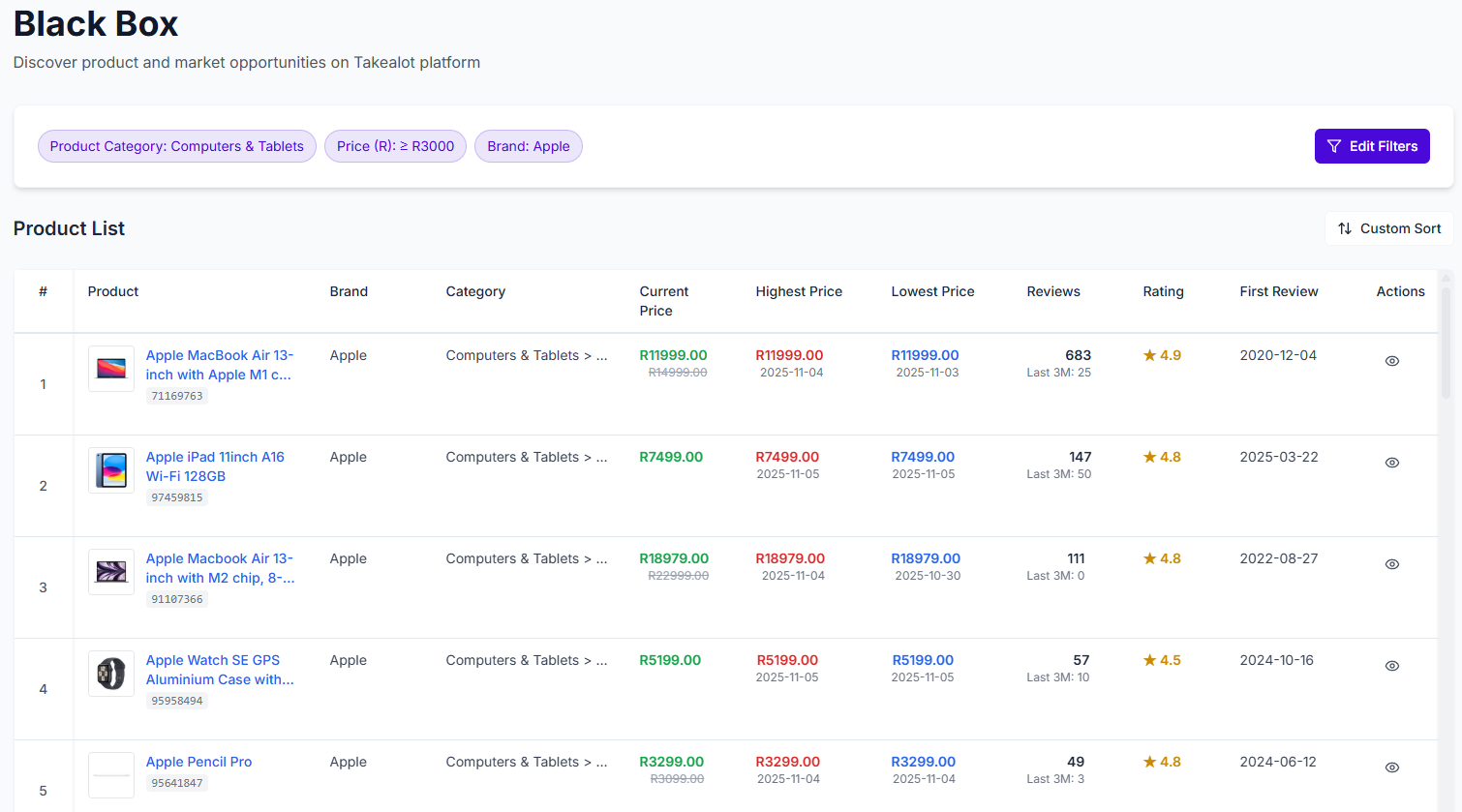
This is where Revenuealot Black Box, also called Smart Selection, is useful. Instead of starting with one keyword or one competitor listing, you can screen a larger market by price, review depth, rating, brand filters, keywords, and trend signals before you decide what deserves deeper validation.
If you want the feature walkthrough beside this article, start with the Smart Selection docs. If you already want to screen opportunities directly, go to Black Box.
Quick answer: how do you find low-competition products on Takealot?
Start by filtering broad results down with price, review depth, ratings, brand presence, and trend signals before you compare individual listings.
That approach helps you:
- cut weak ideas earlier
- avoid niches that only look active on the surface
- build a cleaner shortlist before sourcing or ad spend starts
What Black Box is actually best for
The strongest use case for Black Box is not "find one winning product instantly." It is "cut weak ideas earlier."
That matters because early product research is usually full of false positives:
- a niche has demand, but review barriers are already too deep
- prices look healthy, but margin gets squeezed by unstable price behavior
- the category is active, but dominated by brands you do not want to fight
- the results are broad enough to feel exciting, but too noisy to support a sourcing decision
Black Box helps by turning product research into structured filtering instead of browsing.
The five filters that cut bad ideas early
If you only adjust a few fields at the start, these are usually the most useful:
Filter in Black Box | What it helps you judge | Why it matters early |
|---|---|---|
Category and subcategory | Whether you are studying the right market at all | Keeps the results commercially relevant |
Price range | Whether the opportunity fits your sourcing and margin logic | Avoids shortlisting products you would never price correctly |
Review count | How deep the trust barrier already is | Helps separate accessible demand from defended niches |
Rating | Whether buyers are mostly satisfied or still frustrated | Shows whether there may still be room for a better offer |
Brand include or exclude | Whether the market is brand-led or still open | Prevents large brands from distorting the picture |
These filters are usually enough to answer the first serious question in Takealot product research: is this a market worth validating further, or should I move on now?
What a promising result set usually looks like
The goal is not to find perfect numbers. It is to find a cleaner market shape.
In practice, a result set often looks promising when you can see:
- enough product activity to suggest real demand
- review depth that is meaningful, but not impossible to catch
- pricing that leaves some room for margin
- ratings that are decent without looking completely locked down
- recurring product weaknesses that a better offer might solve
That is usually a better sign than seeing one flashy listing at the top of a search page.
Red flags that often mean the niche is harder than it looks
Sometimes Black Box is most valuable when it saves you from going too far.
Watch for patterns like:
- high ratings plus very deep review counts across the whole set
- attractive prices but unstable price or revenue trends
- broad results that still look poorly matched to your real buyer intent
- heavy brand concentration that leaves little room for smaller sellers
- low review counts combined with weak ratings, which may signal weak demand rather than low competition
This is why review count, rating, and trend context need to be read together.
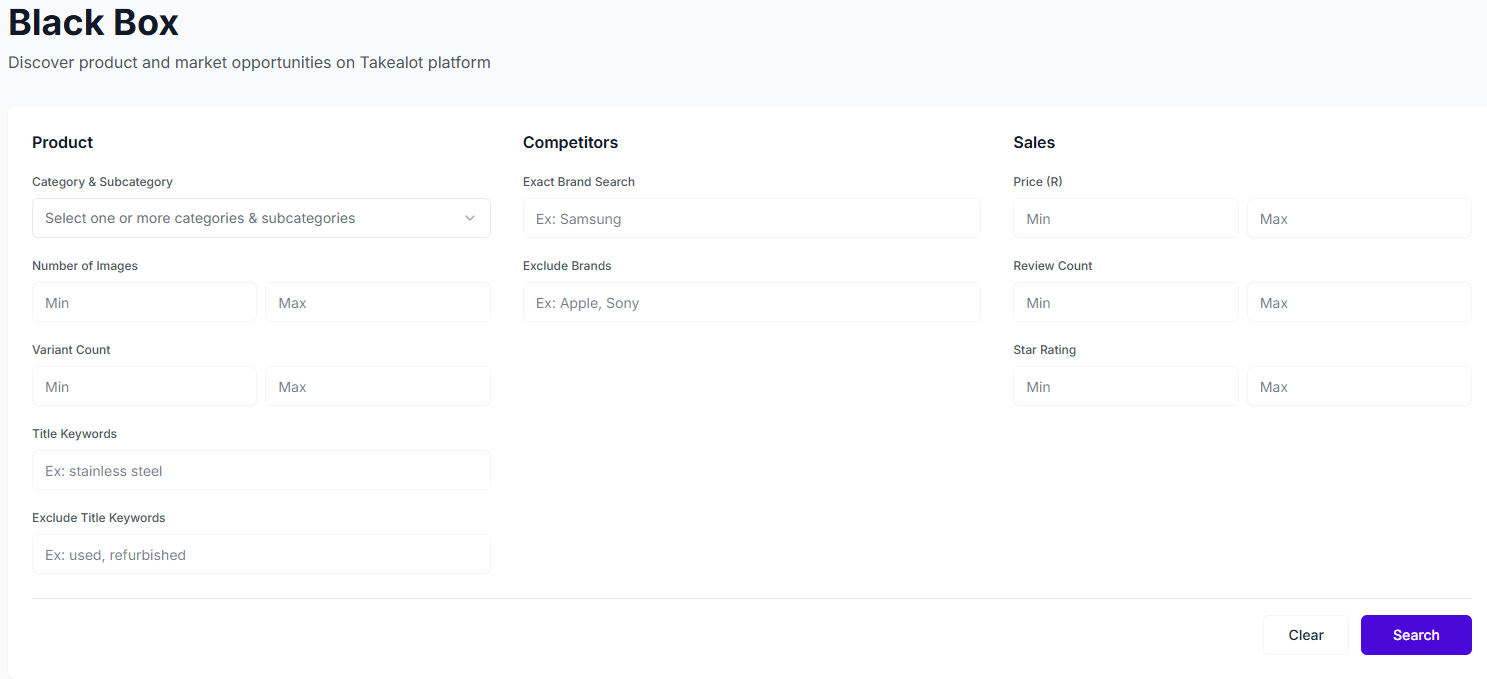
A practical product research flow with Black Box
Once the market starts looking cleaner, the workflow usually becomes straightforward:
- Use Black Box to screen categories, price bands, and competition depth.
- Move the strongest candidates into Competitor Research to compare listings more directly.
- Use Keyword Reverse or Keyword Research to judge search visibility and buyer intent.
That sequence is much stronger than making a sourcing call from one broad keyword search.
When Black Box is more useful than Competitor Research
The distinction is simple:
- use Black Box when you are still shaping the market
- use Competitor Research when you already have a shortlist
If you are still asking, "Which kind of product should I even inspect more closely?", Black Box is usually the better starting point.
FAQ
Does low review count always mean low competition?
No. It can also mean weak buyer interest. That is why you still need to read ratings, price behavior, and overall result quality together.
Is Black Box only for completely new product ideas?
No. It is also useful when you already sell in a category and want to find adjacent opportunities, cleaner sub-niches, or price bands that fit you better.
What should I do after Black Box gives me a few promising results?
The next step is usually Competitor Research. Once you know which products deserve attention, Keyword Reverse and Keyword Research help you judge visibility and search demand.
Final takeaway
Good Takealot product research is rarely about finding the loudest listing. It is about filtering a market until demand, competition, and pricing start to look usable.
Revenuealot Black Box helps you get there earlier. It lets you screen categories before you commit sourcing, listing work, or ad budget, which usually means fewer bad shortlist decisions and better product opportunities.
If you are researching what to sell next, open Black Box and shape the market first. Keep the Smart Selection docs nearby if you want the full feature walkthrough while you work.