Keyword Reverse Search
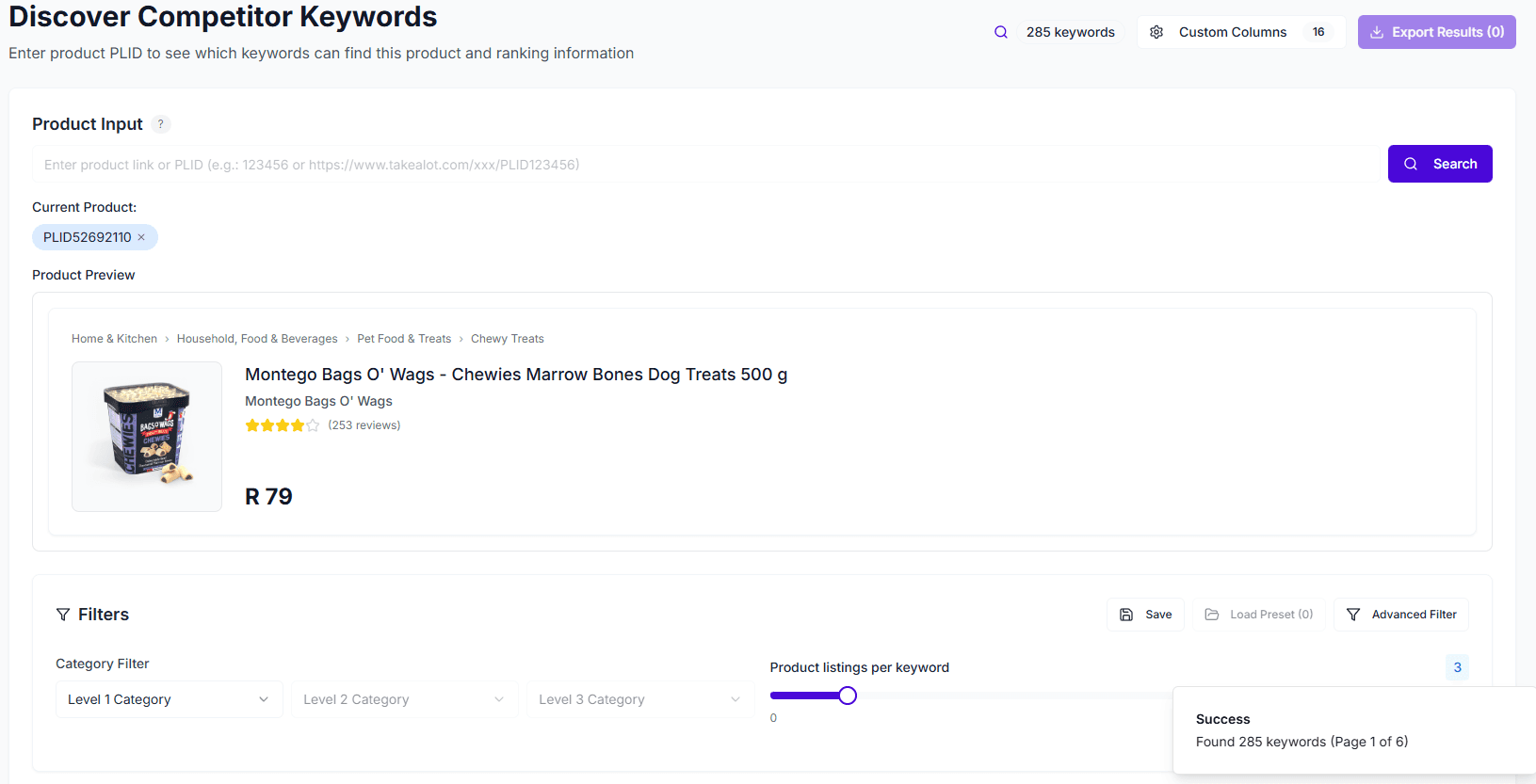
Keyword Reverse Search is a powerful competitor analysis tool. By entering a competitor product’s PLID or URL, you can quickly discover which keywords can find that product on Takealot, along with its ranking positions and advertising performance for those keywords.
Core Value
- Competitor Strategy Insights: Understand which keywords your competitors rank for, revealing their SEO and advertising strategies
- Keyword Discovery: Find high-value keywords to optimize your own product titles and descriptions
- Ad Bidding Reference: View CPC/CPM bidding ranges and CTR data to inform your advertising campaigns
- Ranking Difficulty Assessment: Evaluate ranking difficulty to identify keywords that are easier to rank for
Quick Start
1. Enter Product Information
Two input methods are supported:
- Product URL: Paste the Takealot product page link directly
- PLID: Enter the Product Label ID
Browser Extension: With our Chrome extension installed, you can import the PLID directly from any Takealot product page with one click, no manual copying needed.
2. View Keyword Rankings
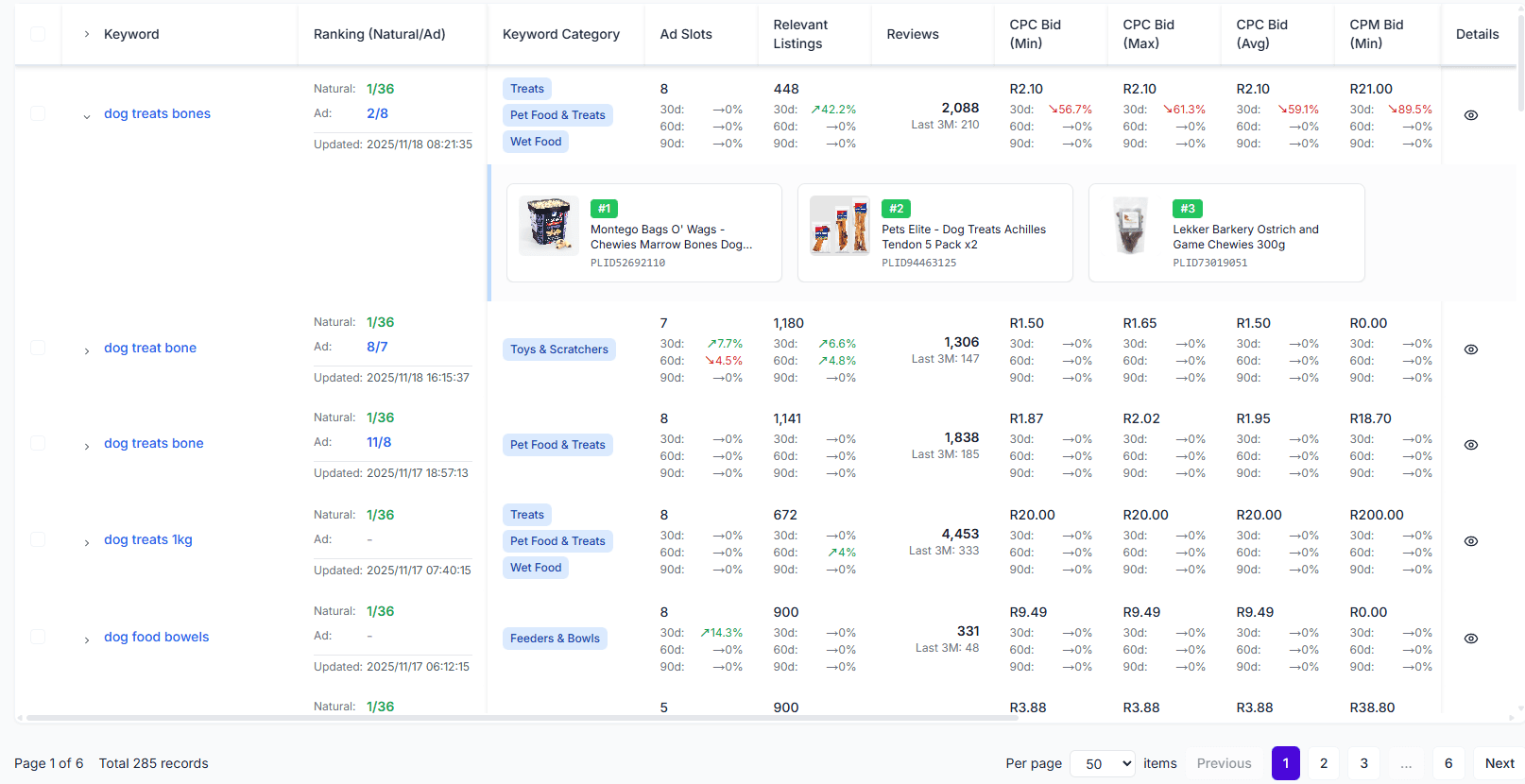
The system returns the product’s ranking positions across all relevant keywords, including:
- Natural Ranking: The product’s position in organic search results
- Ad Ranking: The product’s position in ad placements (if advertising)
- Keyword Category: The product category the keyword belongs to
- Competitor Count: How many other products are competing for this keyword
3. Analyze Advertising Data
Each keyword also provides detailed advertising metrics:
- CPC Bidding Range: Minimum/maximum bids and suggested bid
- CPM Bidding Range: Cost per thousand impressions range
- CTR Data: Minimum/maximum/average click-through rates
- Ranking Difficulty: Assessment of how easy it is to rank for this keyword
Filtering & Sorting
Category Filtering
Supports three-level category filtering to quickly locate keywords in specific categories:
- Level 1 → Level 2 → Level 3
Custom Filters
You can filter by:
- Ranking range (natural ranking/ad ranking)
- CPC/CPM bidding range
- CTR range
- Competitor count range
- Ranking difficulty
Sorting
Supports sorting by any field, for example:
- Sort by ranking ascending to find keywords with the best rankings
- Sort by CPC bid descending to find high-value keywords
- Sort by ranking difficulty ascending to find keywords easiest to rank for
Use Cases
Use Case 1: Competitor Analysis
Goal: Understand competitor keyword strategies
- Enter the competitor product’s PLID or URL
- View which keywords the product ranks for
- Analyze keywords with good rankings to understand their SEO strategy
- Identify keywords they advertise on to understand their ad strategy
Use Case 2: Listing Optimization
Goal: Find high-value keywords to optimize your own products
- Analyze keywords where competitors rank well
- Filter for keywords with high search volume and moderate competition
- Add these keywords to your own product titles and descriptions
- Improve your product’s visibility in relevant searches
Use Case 3: Advertising Strategy
Goal: Select appropriate keywords and bids for advertising
- See which keywords competitors advertise on
- Reference CPC/CPM bidding ranges and CTR data
- Evaluate ranking difficulty to select keywords easier to rank for
- Develop your own advertising strategy and bidding plan
Data Export
Enterprise Feature: Keyword Reverse Search requires an Enterprise plan. Data export requires appropriate subscription permissions.
Export search results to Excel/CSV format for:
- Deep data analysis
- Keyword list management
- Team collaboration and reporting
Notes
- Keyword Reverse Search requires an Enterprise plan
- Ranking data is based on system crawling and may have delays
- We recommend combining with Keyword Research tools for comprehensive keyword analysis