Auto Pricing
Auto Pricing is your core weapon for winning the Buy Box. Through intelligent algorithms, the system automatically adjusts your product prices based on competitor behavior, ensuring you maximize sales opportunities while maintaining profit margins.
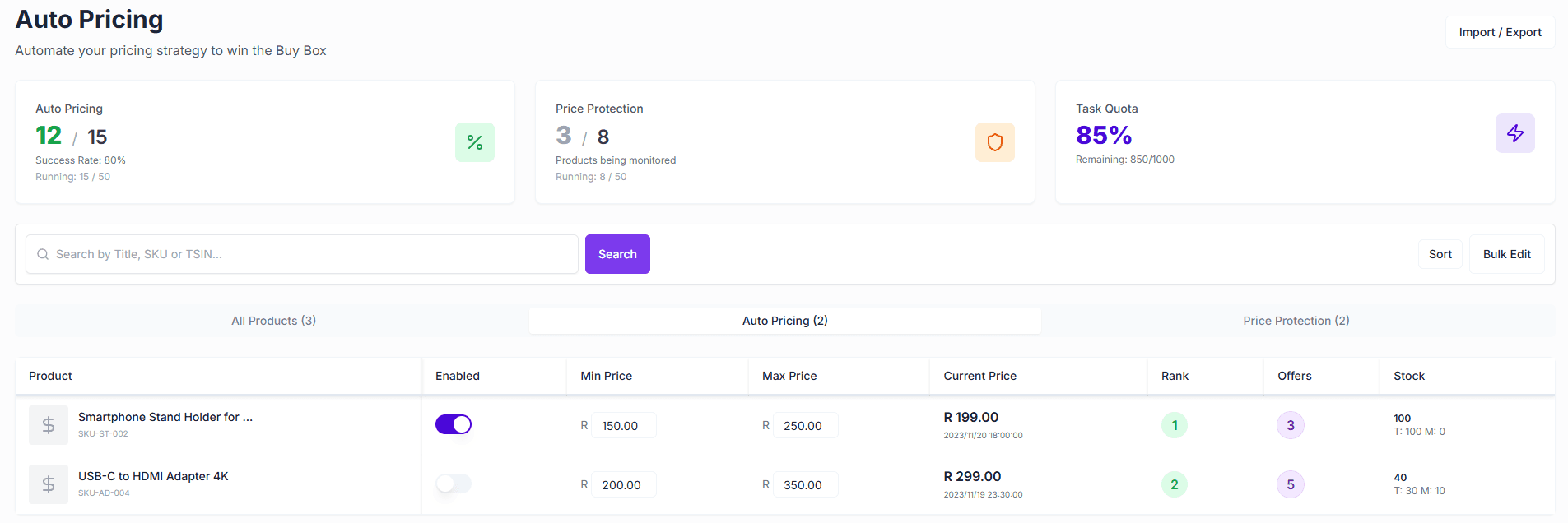
Core Value
- Win the Buy Box: Monitor and beat competitor prices in real-time to secure continuous Buy Box traffic.
- Protect Profits: Set a Min Price to prevent malicious price wars from causing losses.
- Automated Operations: No need for manual monitoring 24/7; the system adjusts prices automatically based on preset rules.
- Price Protection: Even without direct competitors, Price Protection safeguards your listings against unauthorized price drops.
Quick Start
1. Enable Auto Pricing
Configuring auto-pricing rules for your products takes just a few steps:
- Go to the Auto Pricing page and switch to the All Products tab.
- Find the target product and click the ”$” icon in the actions column.
- In the configuration popup:
- Set Min Price: This is your bottom line; the system will never price below this.
- Set Max Price: Prevents pricing too high.
- Choose whether to Compete with Leadtime (compete with sellers who have longer shipping times).
- Click Save, and the system will start repricing for you immediately.
2. Monitor Performance
In the Auto Pricing tab, you can view in real-time:
- Current Price: The latest price adjusted by the system.
- Ranking: Your current position in the Offer list (Green indicates top 2 positions, usually winning the Buy Box).
- BuyBox Offers: The number of Offers currently rotating in the Buy Box.
- Status: Whether the rule is currently active.
Feature Details
Auto Pricing Rules
- Min/Max Price: Safe range to ensure profit and prevent pricing errors.
- Competition Strategy:
- Standard Mode: Adjusts price with the goal of winning the Buy Box.
- Compete with Leadtime: Compete with sellers who have longer shipping times (usually lower prices). If unchecked, the system ignores slow-shipping low-price competitors.
- Enable Price Increase: Automatically raises your price to increase profit when competitors raise prices or go out of stock.
Price Protection
Even if you don’t enable aggressive auto-pricing, you can use Price Protection:
- Monitor Competition: The system monitors the number of other sellers on your listing.
- Whitelist: You can set a whitelist (e.g., your secondary accounts), and the system will exclude them when counting competitors.
- Auto Response: When unauthorized sellers appear, you can use auto-pricing rules to counter them.
Bulk Management
For sellers with a large number of SKUs, we provide bulk operation tools:
- Bulk Edit: Select multiple products in the list to adjust their enabled status or rule parameters at once.
- Import/Export: Support bulk upload of configurations via Excel/CSV files to apply rules to thousands of products quickly.
FAQ
Q: Why hasn’t my price changed after setting auto pricing?
A: The system only adjusts prices when it detects competitor price changes and your current price is not optimal. Also, if the calculated optimal price is below your Min Price, the system will stay at your Min Price.
Q: Is Min Price required?
A: Yes. To protect your funds, a minimum price must be set. This is the final line of defense to prevent the algorithm from causing losses in extreme cases.
Q: What is “Ranking”?
A: This is the position of your Offer on the Takealot frontend page. Rank 1 usually means you hold the Buy Box.