Weekly Return Risk Report
Weekly Return Risk Report is a store-level weekly review page for Takealot operators. It surfaces the return issues that deserve attention first, so you can understand the issue mix, decide which products to investigate, review unclear customer notes, and record follow-up actions at the product level.
The page is designed for operational decisions. Instead of reading every return record one by one, you start from the weekly risk picture and drill down only where action is needed.
What This Page Solves
Return data usually has three problems in day-to-day operations:
- There are many records, but it is hard to identify the most important issue of the week.
- Customer comments are noisy and mix subjective buyer reasons with real product problems.
- Ambiguous notes that require manual review can be buried inside the full return list.
The weekly report separates the workflow into three levels:
- Store level: See which issue groups deserve attention this week.
- Product level: Identify the TSINs most affected by those issues.
- Record level: Review only the return records that need manual confirmation.
Current Reporting Scope
The report focuses on issues that operators can act on. It excludes return reasons that are less useful for product and listing optimization:
Customer CancellationFailed deliverybuyer_remorseno_valid_customer_note
This means Attention Returns, Priority Issue Groups, and Priority Listings are focused on issues that can usually be improved through product quality, listing content, sizing guidance, accessories, fulfillment, or packaging.
Plan access
The Weekly Return Risk Report is currently available for ENTERPRISE plans.
Page Structure
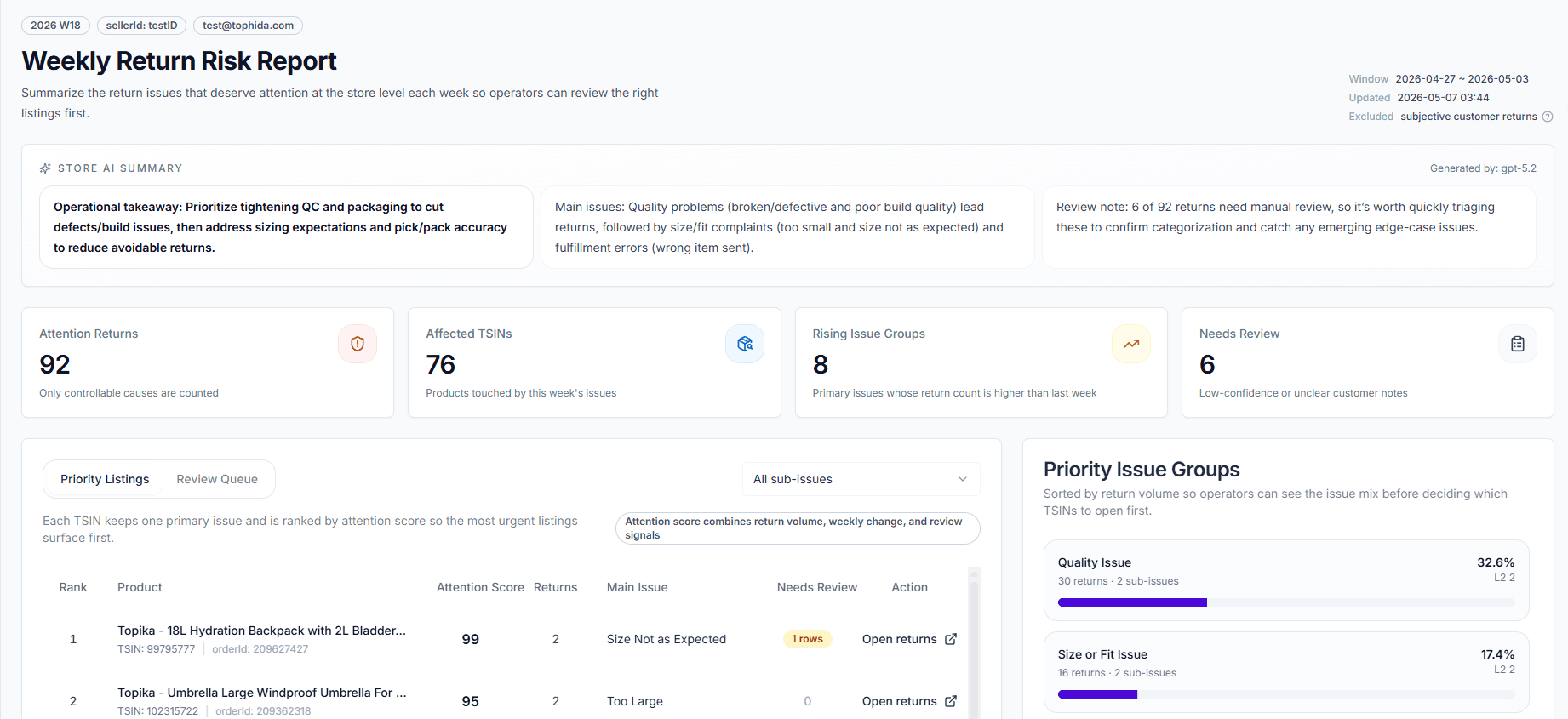
1. Store AI Summary
The AI Summary at the top of the page reads the current store’s weekly return distribution and produces a short operational summary.
Use it to quickly understand:
- The most visible return issue this week
- Which issue groups should be followed up first
- Whether there are obvious quality, sizing, or listing-content risks
If the report does not have enough data yet, or the summary is still being generated, the page shows an empty or loading state.
2. Overview Cards
The overview section contains four core metrics:
- Attention Returns: Returns with controllable causes only
- Affected TSINs: Products touched by this week’s return issues
- Rising Issue Groups: Issue groups whose return count is higher than last week
- Needs Review: Low-confidence or unclear customer notes
These cards help you decide whether the week is showing a broad issue pattern or a smaller number of concentrated product problems.
3. Priority Issue Groups
The Priority Issue Groups section shows the issue distribution sorted by return share, with detail down to the sub-issue level.
Primary issue groups may include:
- Quality issues
- Sizing issues
- Missing parts or wrong item
Sub-issues are more specific, such as:
- Poor workmanship
- Failed after use
- Size too large
- Size too small
- Missing parts
This area answers one question first: What exactly are customers returning this week, and why?
4. Priority Listings
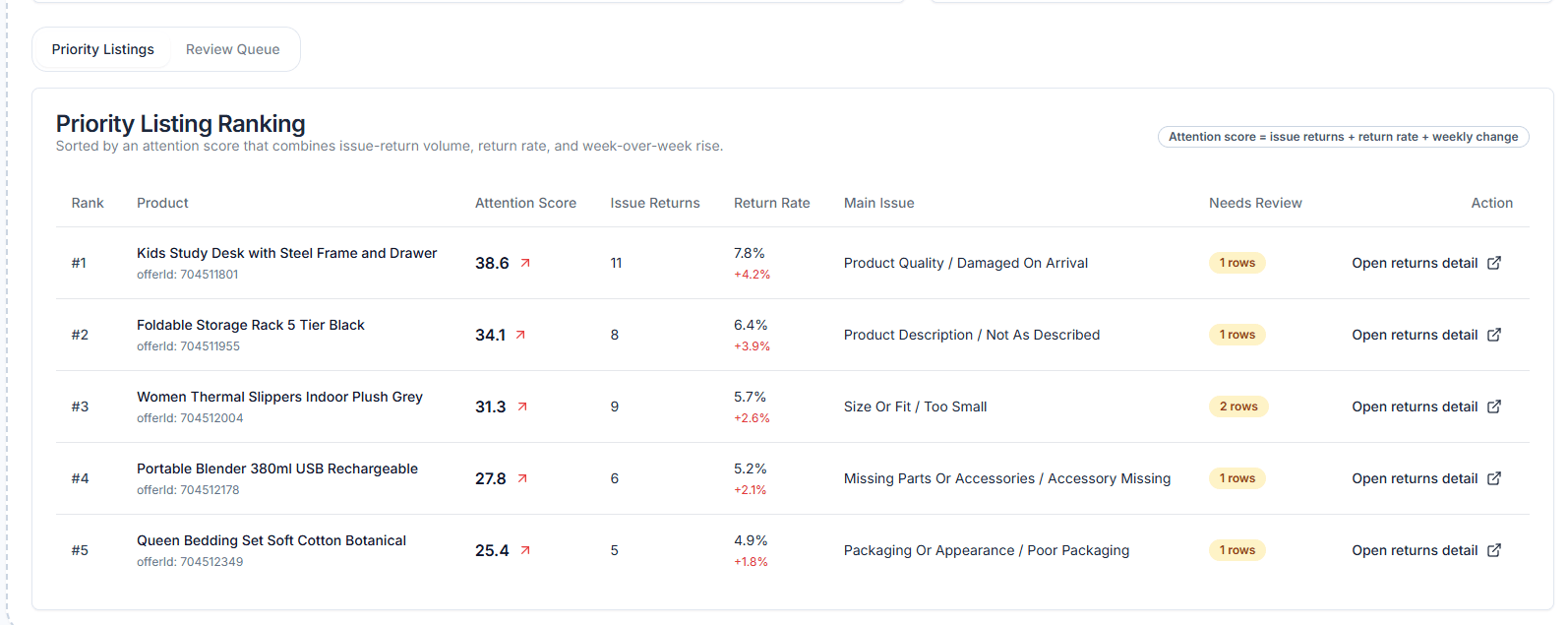
The main table starts on Priority Listings. Each TSIN keeps one primary issue and is sorted by attention score, so the listings that deserve action appear first.
The table includes:
- Rank
- Product title
TSINorderId- Attention Score
- Returns
- Main Issue
- Needs Review
- Open returns
5. Review Queue
The second tab is Review Queue. It only shows return records that need manual confirmation.
These records do not enter the priority issue ranking. Their purpose is to:
- Let operators handle notes that AI cannot classify confidently
- Prevent unclear comments from polluting the issue distribution
- Improve future classification quality after review
You can:
- Click Verify for a single record
- Click Verify page for the current page
- Click Open to drill into the related product return page
How to Read the Attention Score
The attention score is not a simple return count ranking. It combines:
- Current-week return volume
- Week-over-week movement
- Whether there are records still needing review
When two products have similar return counts, the one with a sharper weekly increase or unresolved review signals will usually rank higher.
What Happens After Opening a Product
When you click Open returns, the product return analysis page opens with the same weekly context:
- Same store
- Same weekly date range
- Same main issue, if you filtered the report by a sub-issue
- Same excluded return scope as the weekly report
The product page then shows:
- Return records for that product and week
- AI issue-category breakdown
- AI product summary
- Review queue
- Product-level return strategy note
This creates a complete flow from store weekly report -> product investigation -> individual return record.
Product-Level Strategy Note
At the bottom of the product return page, you can add a strategy note for the current product.
Use it to record:
- Follow-up actions the team plans to take
- Confirmed issue conclusions
- Internal operation notes for future reviews
Examples:
- “Check whether the April batch has workmanship differences.”
- “Add chest width and strap length to the size guidance.”
- “No action for now. Continue monitoring for two more weeks.”
The next time the team opens this product from the weekly report, the existing decision is already visible.
Recommended Workflow
Weekly review flow
- Start with the AI Summary and overview cards to judge whether risk is spreading or concentrated.
- Check Priority Issue Groups to identify the main return reasons.
- Open Priority Listings and handle the highest attention TSINs first.
- Use Review Queue to clear records that need manual judgment.
- Drill into product return pages and record strategy notes for follow-up.
Typical Use Cases
Weekly operations review Use the report to decide which return problems deserve discussion this week instead of reading the full return stream.
Find risky products Start from store-level risk, then drill into one TSIN to confirm whether the cause is quality, sizing, wrong item, missing parts, or listing content.
Clean up unclear return notes Use the review queue to handle low-confidence records so future category statistics stay cleaner.
Best practice Use the weekly report for prioritization and the product return page for confirmation and action tracking. Together, they are faster than working directly from raw return records.