Sync History
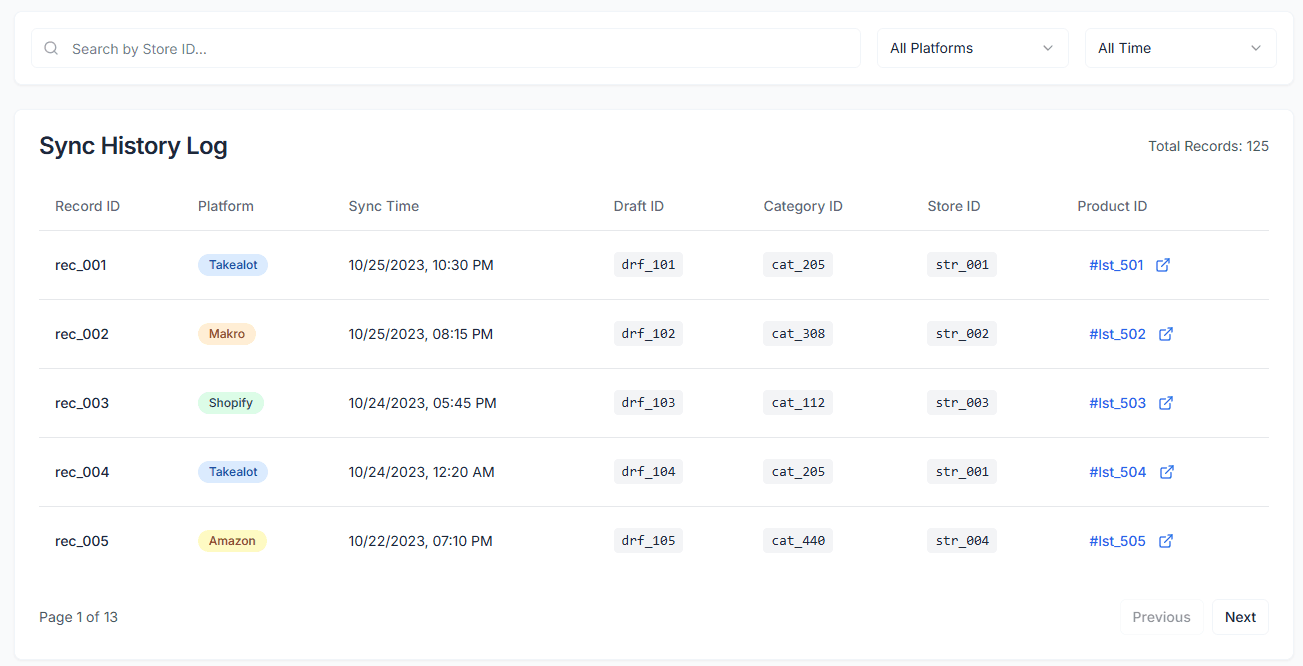
Sync History provides a complete audit log of all your product synchronization operations. Whether importing from external platforms or publishing updates to sales channels, every action is detailed, helping you track data flow and quickly troubleshoot issues.
Core Value
- Transparent Tracking: View the status of all sync tasks in real-time to ensure data updates occur as expected
- Multi-Platform Support: Unified view of sync records for all platforms like Takealot, Makro, Shopify, etc.
- Troubleshooting: Quickly locate reasons for sync failures (e.g., image validation failed, network timeout)
- Detailed Audit: Records the specific time, involved Listing IDs, and change details for each operation
Feature Details
1. Records List
Each record contains the following key information:
- Record ID: Unique identifier for the sync task
- Platform: Target or source platform (Takealot, Makro, Shopify, etc.)
- Sync Time: Specific time the task was executed
- Key IDs:
- Draft ID: Reference ID for the local draft
- Category ID: Associated product category ID
- Store ID: ID of the store performing the operation
- Product ID: Listing ID on the target platform (clickable to view directly)
2. Filter & Search
Use the top toolbar to quickly filter specific records:
- Search: Enter Store ID to find operation records for a specific store
- Platform Filter: View sync history for a specific platform only (e.g., Takealot)
- Time Range: Filter records for a specific time period (Today, This Week, This Month)
Status Guide
- Success: Sync task completed successfully, data updated
- Failed: Task failed, usually with an error reason (e.g., “Invalid Image”, “SKU already exists”)
- Pending: Task is in the queue waiting to be processed
If you encounter a sync failure, check the details in the record. For common validation errors (like missing required fields), you can correct them on the “Listing Management” page and retry the sync.