Makro Store Metrics
Makro Store Metrics gives you a focused view of a single Makro store across a selected date range. It is designed around three things: net sales, returns, and top-performing products, making it useful for weekly reviews, operational checks, and exception analysis.
The page loads the last 30 days by default and automatically compares it against the previous period of equal length.
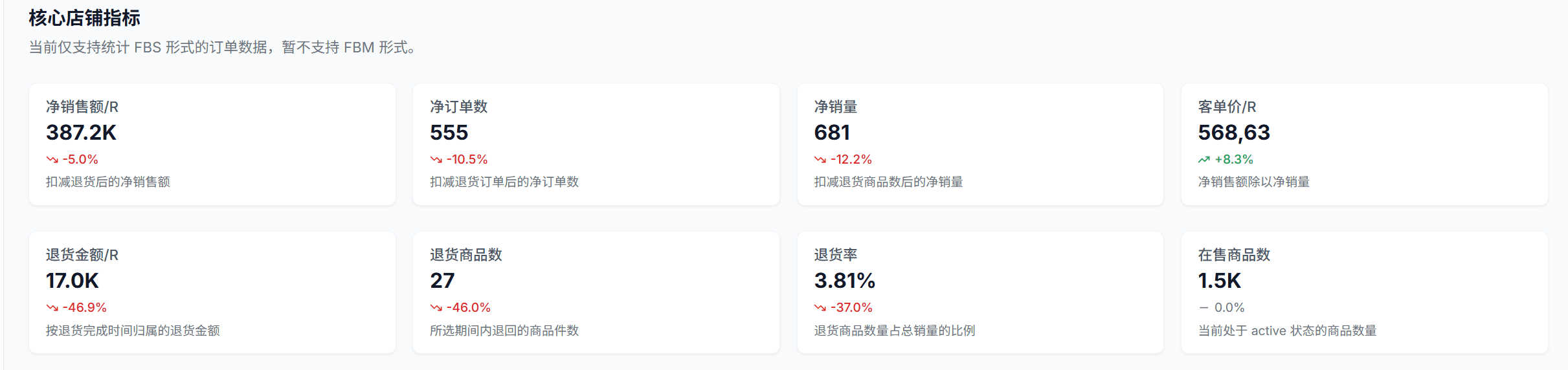
Core Metric Overview
The dashboard shows 8 core metrics in two rows.
First row
- Net Sales / R: Sales value after returned units are deducted
- Net Orders: Orders after returned orders are deducted
- Net Units: Units sold after returned quantity is deducted
- AOV / R: Net sales divided by net units
Second row
- Refund Amount / R: Refund amount confirmed in the selected period
- Returned Units: Quantity returned in the selected period
- Refund Rate: Returned units as a share of total units sold
- Active Products: Products currently in
Activestatus
Each metric card can show:
- The current value for the selected period
- Period-over-period change versus the previous range
- A short description of what the metric means
Makro store metrics currently support FBS order data only. FBM is not included yet.
Date Range and Period Comparison
Use the date picker at the top of the page to control the analysis window.
- Default range: Last 30 days
- Custom range: Any start and end date
- Automatic comparison: The system calculates the previous period with the same number of days
For example, if you select March 1, 2026 to March 30, 2026, the dashboard automatically compares it with the immediately preceding 30-day window.
Trend Analysis
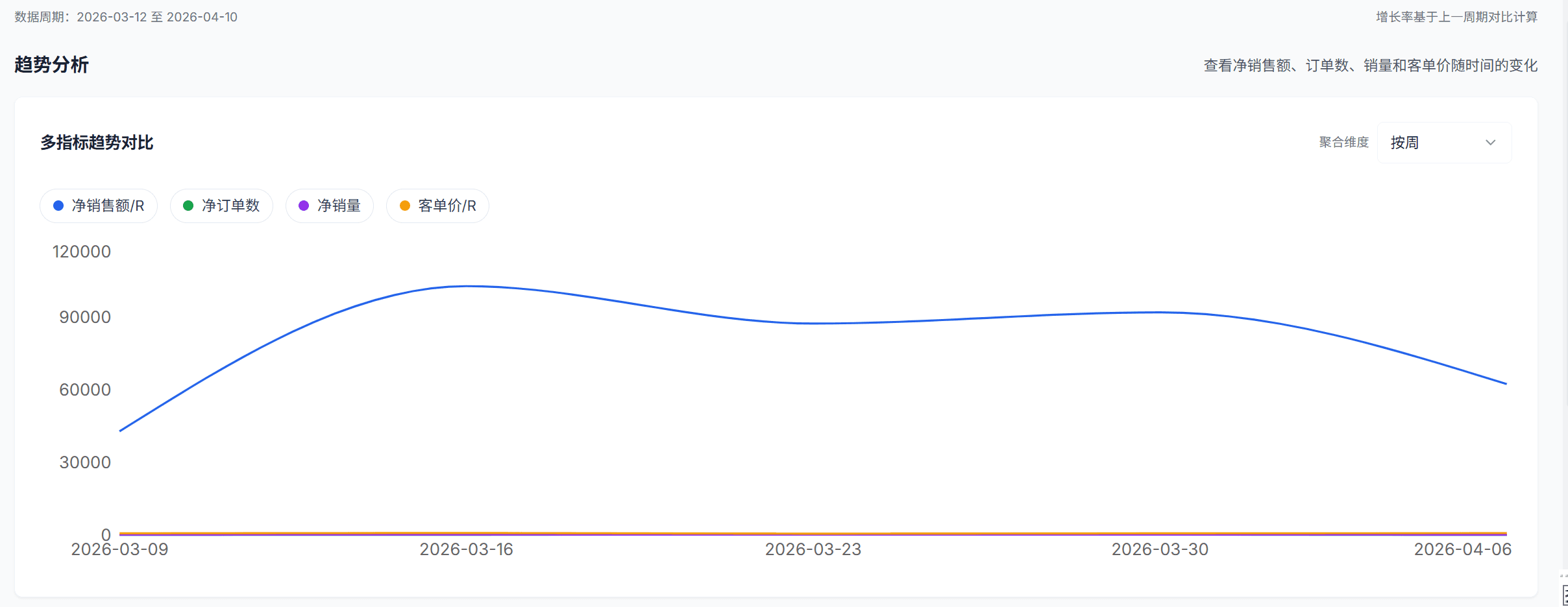
The trend chart is built to show how key metrics move over time, not just the final totals.
Available trend metrics
- Net Sales
- Net Orders
- Net Units
- Average Order Value
- Returned Units
- Refund Orders
- Refund Amount
- Refund Rate
How to use it
- Compare multiple metrics on one chart
- Switch aggregation between
day / week / month - Toggle metrics on and off from the legend to isolate specific signals
If the chart feels noisy, start with Net Sales, Net Orders, and Refund Amount, then add other metrics only when needed.
Product Sales Ranking
The bottom section shows a Top 20 product ranking comparison, helping you see which products are driving performance.
Two ranking views
- Revenue period-over-period: Compare the top products by sales value across the current and previous periods
- Units period-over-period: Compare the top products by units sold across the same two periods
Why it matters
- See whether growth is concentrated in a few SKUs
- Spot products that have dropped out of the top tier
- Check whether a new product or promotion has entered the top ranks
The ranking cards show:
- Current period Top 20
- Previous period Top 20
- Product image, title, sales, and unit information
Typical Use Cases
Weekly business review
Check Net Sales, Net Orders, and AOV first to understand overall store health before drilling down.
Returns investigation
When Refund Amount or Refund Rate rises, use the trend chart and product ranking together to determine whether the issue is store-wide or SKU-specific.
Recommended workflow Start with the metric cards to identify the problem type, use the trend chart to locate when it changed, then use product ranking to find which products are involved.